
How your study is built
One platform, two services, nothing hidden.
Connect payroll, GL and engineering systems or upload exports. Every figure is tied to its source and tested against the statute before R&D experts finalize the study.
We typically reply within one business day.

- Callout 1: Every issued document, marked current or superseded
- Callout 2: A plain line on whether it is filed with the return or kept with your records
Your client portal
One portal for both studies. You see where your study stands, what is still needed, and what has been issued to you, all the way through.
R&D credit study
- Upload payroll, general-ledger, and project data
- Answer technical interviews and review your narratives
- Download your study report, filing packet and Form 6765 package
- See exactly where your study stands and what we need next
Cost segregation study
- Describe the property in a short profile
- Upload the closing statement, cost records and drawings you have
- Take photos from a guided shot list
- Sign the representation letter, then download your study report
Your tax preparer and your leadership read the same file from the same place. See what each of them receives. Not a client yet? Start with a free assessment.
The engine’s five stages, each accountable to the last
Data flows one way, from source systems to a finalized study, and every stage must clear before the next begins.
Where the software says no
-
At intake. Required facts are collected as structured fields, not free text an analyst has to interpret later.
-
At submission. A component that cannot answer all four parts of the test cannot be submitted as qualified.
-
Before finalization. The credit will not finalize while substantiation behind any included component is incomplete.
The portal collects employee duties and roles, component types, alternatives evaluated, supply, computer and contract screens, and trade-or-business facts as structured records, which is what makes the three gates above enforceable at all.
-
Step 1: Collect
Payroll, general ledger, and engineering evidence flow in through secure connectors or uploads - organized automatically. Gate: Nothing advances until every amount traces back to a source you can point at.
-
Step 2: Substantiate
Every business component is documented against the §41 tests before a dollar is counted - the platform enforces it. Gate: A component with an incomplete §41 record contributes no QRE.
-
Step 3: Compute
QREs, both credit methods, state credits, and your §174A position - computed from one substantiated base. Gate: Both methods are computed before either one is recommended.
-
Step 4: Challenge
An independent AI examiner red-teams the study; a second model family runs compliance QC; humans resolve disagreements. Gate: Disagreement routes to people. The platform abstains rather than guesses.
-
Step 5: Deliver
R&D experts review and finalize. You receive the study and filing-ready forms; the organized audit file stays with your Ricerca team. Gate: No study issues without an expert sign-off on complete substantiation.
These are the software’s stages. The study itself runs in six phases, and each one asks something specific of your team: how a study runs, end to end.
Your Ricerca team’s workbench
The screens your study is reviewed on, cropped to the part that carries each claim. Synthetic study data throughout.
-
Blocking checks, section by section
The review workbench partitions every check by status: what blocks issuing, what has to be answered, what passes. A study will not finalize while a blocker is open, and each determination cites the authority it rests on.
- All eight §41(d)(4) exclusion screens, applied up front
- Funded research and rights-and-risk analysis on contract work

- Callout 1: Checks that block finalization, counted across the study
- Callout 2: Each determination cites the statute and regulations it rests on
Synthetic study data. -
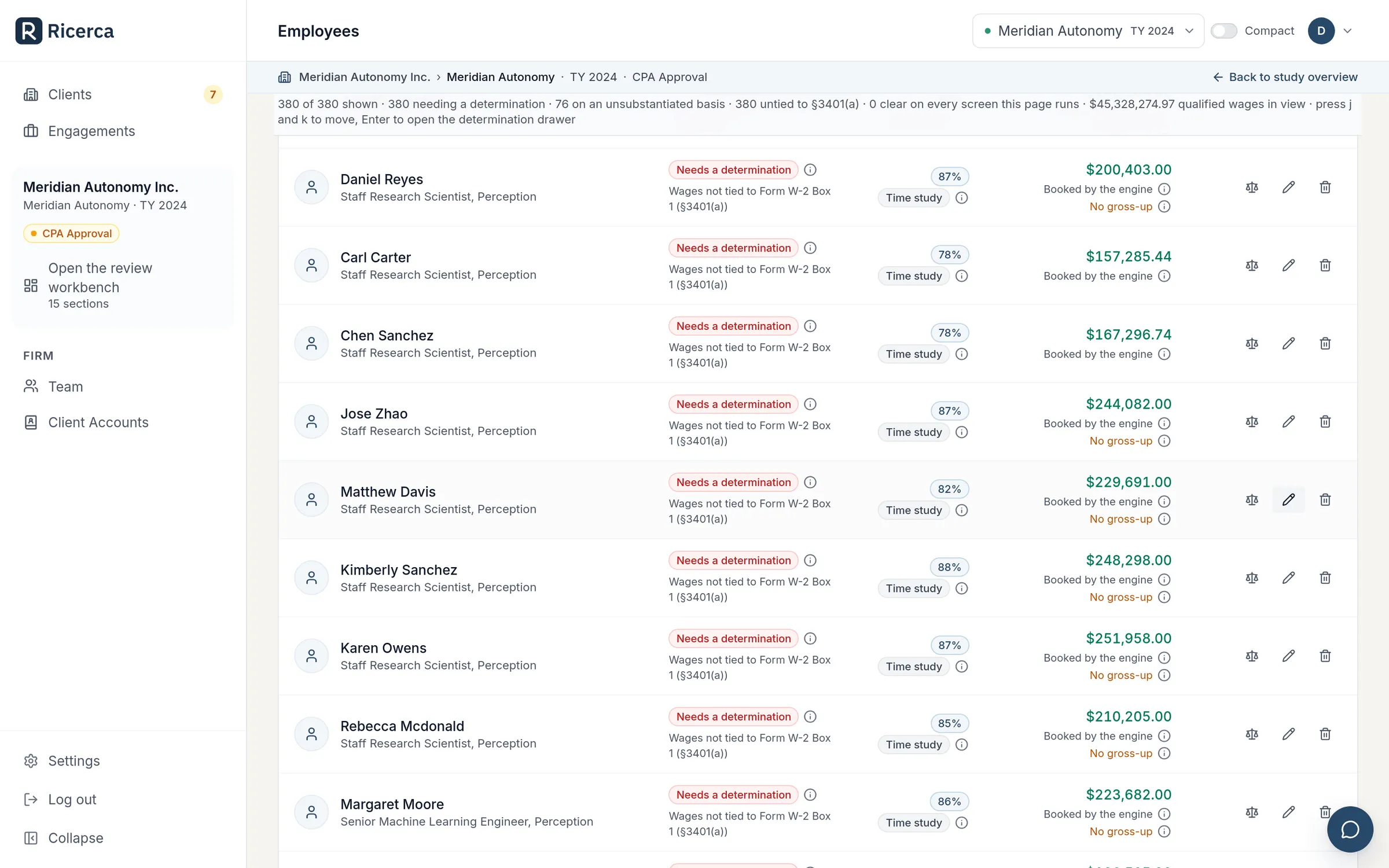
Wages allocated person by person
Every person in the claim carries their own qualified percentage, the basis recorded for it, and the wage figure that follows, so the wage line of the workpaper is a sum of decisions, not an estimate applied to a department.
Synthetic study data. -
Delivery in three enforced steps
Three steps in a fixed order: the final document is generated, the study is locked, then it is issued to you. The server enforces the order rather than a person remembering it, and nothing runs while a pre-issuance check is open.

Synthetic study data.
The rules behind each screen are written up in the guide: the four-part test applied per component, which costs become qualified research expenses (including the statutory contract-research percentages), and what documentation an examiner actually asks to see.
One substantiated QRE set
Every layer of benefit is computed from the same qualified expenses, screened against the same statutory tests. Build the base once and the benefits stop contradicting each other.
The federal §41 credit, your state credits, the §41(h) payroll offset and your §174A position all read from this chain. If a figure cannot be traced back along it, it does not go in the study.
- Source systems: Payroll and HRIS; Ledger and engineering tickets.
- Evidence: Time and cost records; Contemporaneous project records.
- Component narratives: One per business component; Four-part test applied to each.
- QRE workpapers: By category and by employee; Tied to the ledger accounts.
- Form 6765 lines: Section A or B, and Section G; Each line tied to a workpaper.
- Audit-defense binder: Indexed exhibits per component; Provenance for every figure.
- Every number traces back to a source row
Inside the engine
Every layer of benefit, from one base
Once the facts are in, the platform computes the full stack, so nothing is left behind and nothing double-counts.
- Both methods, compared
- The Regular Credit and the Alternative Simplified Credit are both computed so you can see the stronger result - with the §280C reduced-credit election considered in context.
- §41(f) controlled groups
- Related entities are aggregated as a single taxpayer, the group credit is allocated across members on QRE share, and a standalone controlled-group statement documents the determination.
- Payroll-tax offset for startups
- Qualified small businesses can elect under §41(h) to apply up to $500,000 per year of the credit against payroll taxes - computed and carried onto Form 8974.
- State credits, same base
- State R&D credits are computed from the same substantiated QRE base, with each state’s own qualification and exclusion rules applied - the benefit most studies leave behind.
- §174A expensing position
- Your domestic research expensing position under the new §174A is mapped alongside the credit - deduction and credit, captured together and consistently.
- Prior years & amendments
- Open prior years, base-period amounts, and amended-return posture are handled from the same books-and-records trail, so history and current-year positions stay consistent.
How the two methods differ, and what the §280C(c) election does to the net number, is explained in calculation methods. The startup cash path lives in the §41(h) payroll offset, the state layer in state R&D credits, and the deduction side in §174A expensing.
The platform argues with itself, so the IRS doesn’t have to
Before a study reaches human reviewers, it survives independent AI reviewers from different model families, and a system that would rather stop than guess.
The qualification engine is also regression-tested in CI against a golden set of §41 fact patterns, with a hard gate on over-claiming, so a release can’t quietly loosen what qualifies. If a claim is ever examined, Audit Protection means we prepare the response, the documentation, and the technical defense of the study, working alongside your tax preparer.
- 01
Independent AI examiner
A red-team agent - a different AI model family than the one that drafted the study - challenges qualification the way an IRS examiner would, hunting for weak components before an examiner can.
- 02
Cross-family compliance QC
A second, independent model family re-checks the statutory tests and the math. Independence is counted by model family, so the same brain never grades its own homework.
- 03
Abstention gate
When reviewers disagree or substantiation is thin, the platform abstains - no study auto-issues. Open questions route to people, in a workflow built around the AICPA standards for tax positions.
- 04
Experts finalize
R&D experts review qualification decisions, amounts, and narratives, and finalize every R&D credit study before it is issued. Approval is gated on complete §41 substantiation - the software will not let it through otherwise.
A deliverable set built for three readers
Your leadership gets clarity, your preparer gets filing-ready forms, and, if it ever comes to it, an examiner gets organized, contemporaneous substantiation.
The study report
Credit summary plus technical narratives per business component, mapped to the four-part test.
A filing packet for your preparer
Every figure your preparer enters, keyed to the form line it goes on, with your state credits alongside.
Filing-ready forms
Form 6765 (Dec. 2024 revision, Sections A-G) that reconciles on its face, Form 8974 for the payroll offset, a pro-forma Form 3800, and the controlled-group statement where one applies.
The file behind it
QRE workpapers traced to payroll, GL and invoice sources, and an audit file organized the way an examiner will ask for it.
From the system it comes out of, to the page of the study it lands on
| What you connect or send | Where it lands in the study |
|---|---|
| Payroll register and HRIS roster | The wage allocation grid - a qualified percentage and its recorded basis on every row - footing to the wage line of the QRE workpaper and Form 6765 Section F. |
| General ledger detail | Supply and computer-rental categories in the QRE workpaper, each figure tied back to the account it came from. |
| Vendor and cloud invoices | The supply, cloud, and computer-rental lines, with the invoice retained as the exhibit behind the figure. |
| Contract-research agreements and statements of work | The funded-research and rights-and-risk analysis, and the contract-research line capped at the statutory 65%. |
| Issue tracker and source-control metadata (never source code) | The contemporaneous record behind each business component narrative, and the evidence rail a reviewer opens next to it. |
| Short technical sessions with your engineers | The four-part-test record for each business component, and the Section G business-component detail. |
| Entity and ownership structure | The §41(f) controlled-group determination and the allocation statement issued with the study. |
Built like the tax data it holds is sensitive
Payroll files, general ledgers and engineering records are among the most sensitive data a company has. The platform treats them that way at every layer.
We don’t advertise certifications we don’t hold. What follows is what the system does: controls you can ask us to walk through, not badges on a wall. Both service lines run on the same controls.
Our security approachEncrypted everywhere
Data is encrypted in transit and at rest, with integration tokens sealed under dedicated key encryption.
§7216 confidentiality, automated
Taxpayer-identifying data is automatically redacted before any AI processing - confidentiality enforced in code, not policy documents.
Enterprise AI routing
In production, AI calls route exclusively through enterprise Azure AI Foundry endpoints. Your data is never used to train public or third-party models.
Read-only, minimal connectors
Accounting and payroll connections are read-only; engineering connectors collect metadata only - never your source code.
Modern access control
Sign in with Microsoft 365 single sign-on, role-based access, and tenant isolation that keeps every organization’s data separate.
E-signed engagements
Engagement letters are signed electronically in the portal, so scope, terms, and authorization are on record before work begins.
We meet your data where it lives.
Ricerca pulls wages, the general ledger, and engineering evidence from the tools you already use, so intake is near-effortless and every qualified dollar traces back to source. And you can always start from a secure spreadsheet, GL, or payroll export - no integration is ever required.
- Live Connect today with a direct OAuth link
- Rolling out Connector built - being enabled now
- Planned On the roadmap
Accounting & ERP
QuickBooks Online connects directly today. The rest connect through our unified accounting connector - one secure, read-only link to your general ledger.
- Live QuickBooks Online
- Rolling out Xero
- Rolling out NetSuite
- Rolling out Sage Intacct
- Rolling out Dynamics 365 Business Central
- Rolling out FreshBooks
Payroll & HR
One secure connection reaches the major payroll and HRIS systems through one unified connector - these are the ones we see most.
- Rolling out ADP
- Rolling out Gusto
- Rolling out Paychex
- Rolling out Justworks
- Rolling out Rippling
- Rolling out TriNet
- Rolling out Workday
- Rolling out BambooHR
Engineering evidence
Contemporaneous proof of experimentation from the tools your engineers already use. Metadata only - commits, pull requests, and tickets. Never your source code.
- Rolling out GitHub
- Rolling out Jira
- Planned GitLab
- Planned Bitbucket
- Planned Linear
- Planned Azure DevOps
Don’t see your system? Tell us what you use - our connector layer reaches the major payroll, accounting, and HRIS platforms through one unified connector, and secure exports work today regardless.
All product names, logos, and brands are property of their respective owners, used for identification only; no endorsement is implied.
See the platform on your own numbers
Connect a system or upload an export, and we’ll show you what a fully substantiated study looks like: computed, challenged, and finalized by R&D experts.