
Six screens your team works in
Real screens from the platform on synthetic study data, cropped to what each one does.
- 01
Every client engagement on one board
The pipeline holds every client study by stage, with a ranked list of what needs a person next. It deliberately carries no wages, QRE dollars or credits.
- Board and list views, filtered to mine, active, in review or flagged
- Visible to firm admins, partners and managers

- Callout 1: Counts by stage across every client, and no dollar figures.
- Callout 2: Needs you: the next actions across all studies, most urgent first.
- Callout 3: A study with blocking items comes first.
firm.ricercacredit.com/pipeline. Synthetic studies.
- 02
The review workbench
Open any study into the same three-pane workbench Ricerca’s own team uses for its direct studies: the phase rail, the open item, and the record behind it.
- Readiness checks block issue until they are cleared
- Items a partner must affirm are marked as such
- The record behind each check sits beside it

- Callout 1: What blocks finalization, stated up front.
- Callout 2: Items the partner must affirm are marked as such.
- Callout 3: The phase rail: scope, substance and money, each with what is still open.
The study workbench. Synthetic study data.
- 03
Business components and the four-part test
Each business component shows what the AI concluded, which four-part-test answers are missing and which flags are open. Nothing moves past needs review until your team records the determinations.
- Every AI flag needs a human disposition
- Require a written basis per team member
- Determinations recorded per business component
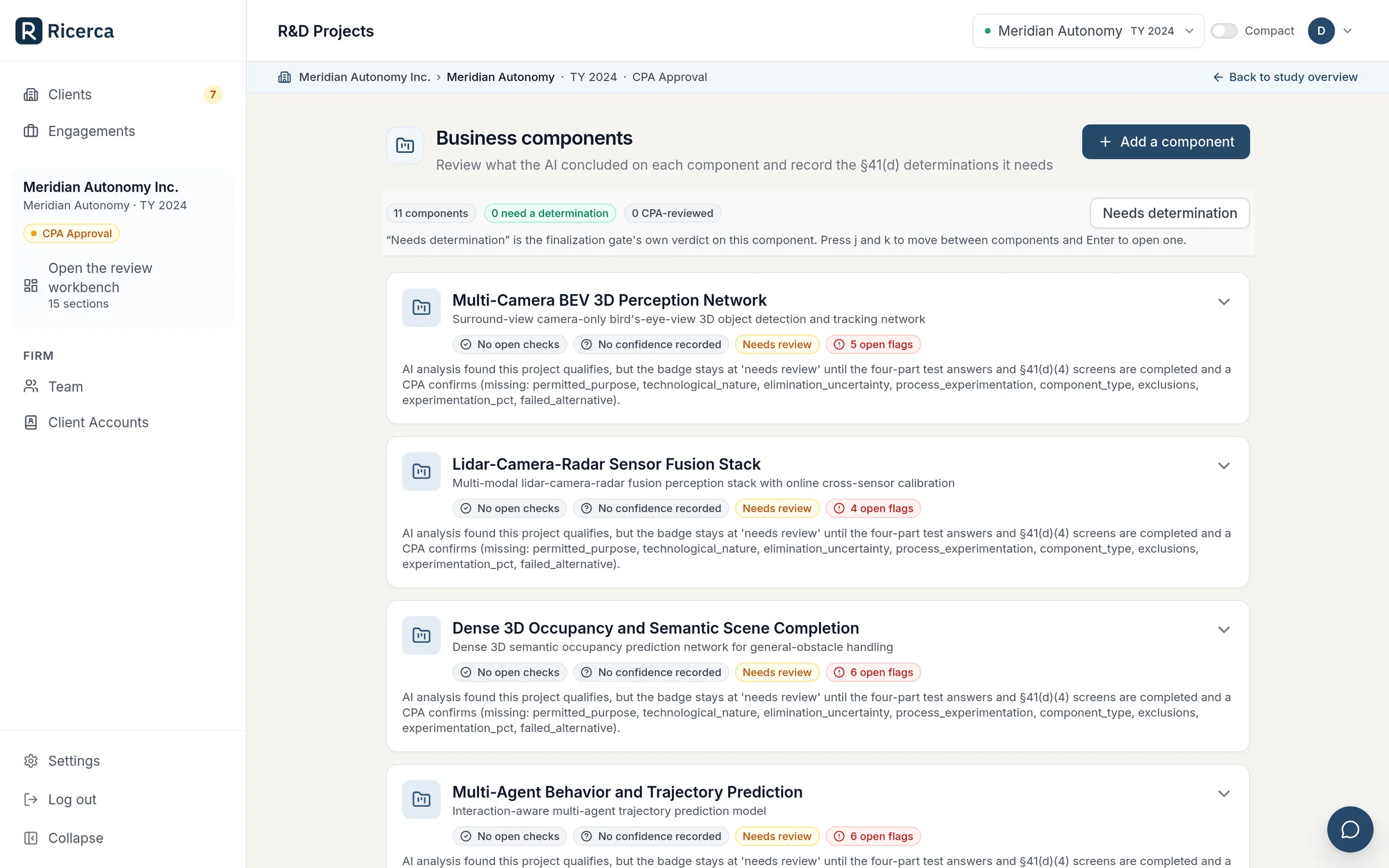
- Callout 1: Determinations and CPA review, tracked per component.
- Callout 2: Open AI flags, each waiting for a person’s disposition.
- Callout 3: Needs review until the four-part-test answers are complete and a CPA confirms.
Business components. Synthetic study data.
- 04
People, wages and the ledger
Every person on the roster with the qualified percentage, its basis, the qualified wage and the determination still open. The ledger gets the same treatment: the platform proposes candidate costs and your team decides.
- Smart Intake suggests a qualified-time percentage and role from job title and industry
- Candidate supplies, computer-rental and contract-research costs, each approved or rejected
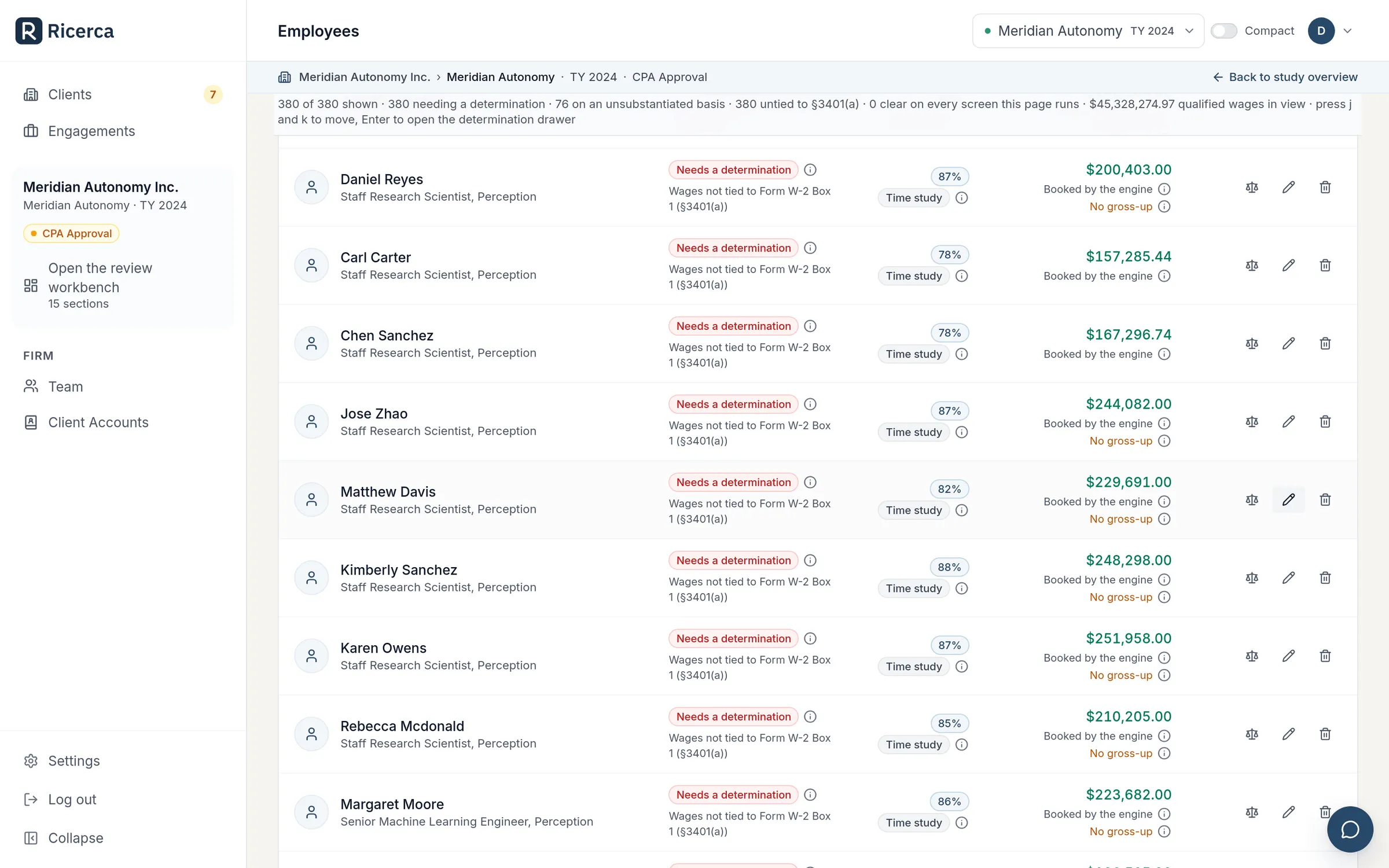
- Callout 1: Each person carries an open determination until someone records it.
- Callout 2: The qualified percentage and the basis behind it.
- Callout 3: The qualified wage the engine booked, with its caveats.
The wage allocation grid. Synthetic study data.
- 05
Narratives your preparers direct
AI drafts the qualification write-ups. Your preparers accept, edit or regenerate a section, or instruct the AI to redraft it, then approve or reject each revision.
- Every review stamps a name and the time
- Client answers can be polished into prose while the original stays on the record
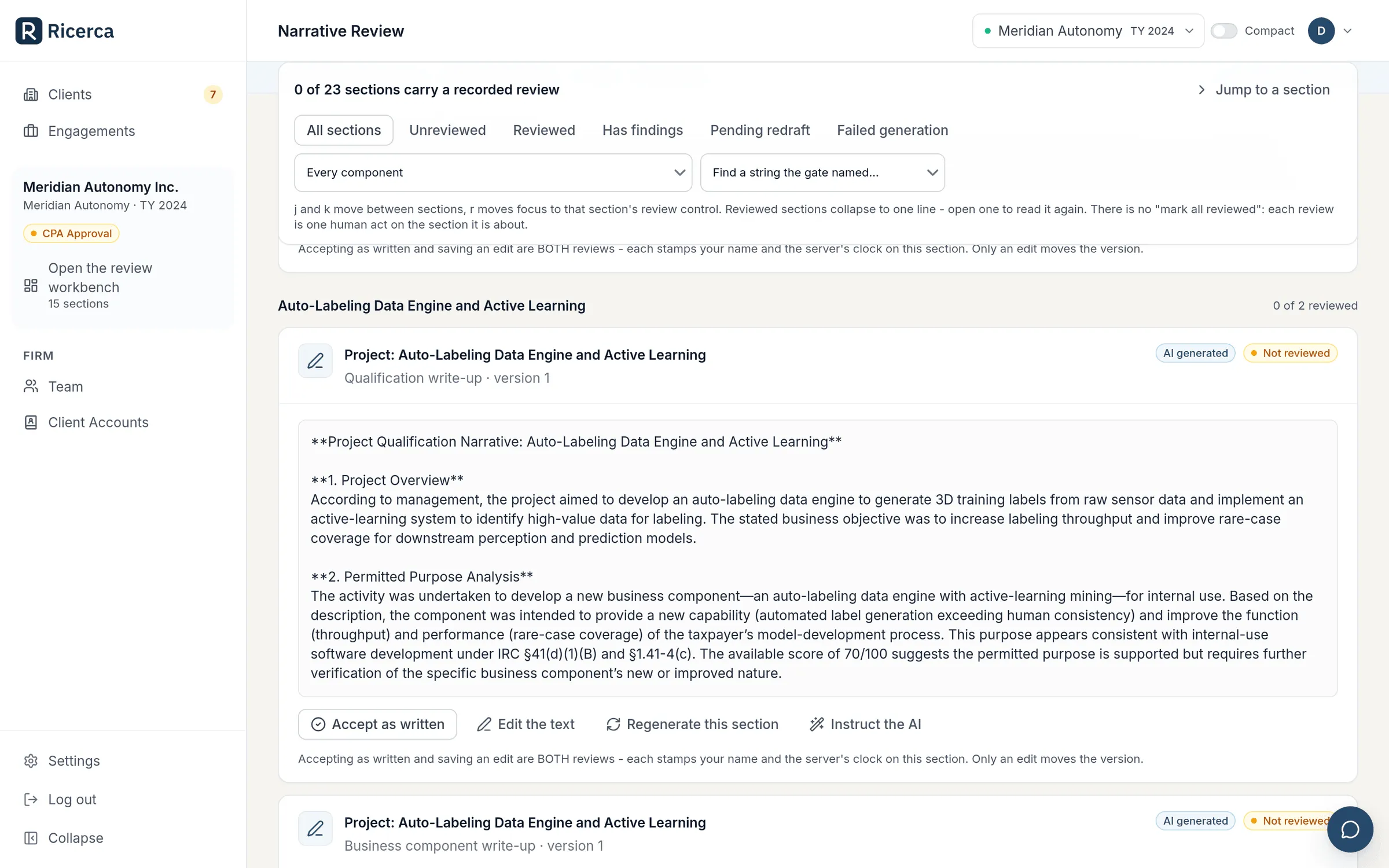
- Callout 1: AI-drafted and unreviewed until a person acts.
- Callout 2: Accept, edit, regenerate, or instruct the AI.
- Callout 3: Versioned: an edit moves the version.
Narrative review. Synthetic study data.
- 06
Three enforced delivery steps
Generating a final document, finalizing and locking the study, and issuing to the client are three separate acts, in that order. Issued versions can be withdrawn, and every version stays on the record.
- Only a CPA signer, partner or firm admin can issue
- Your client downloads only what you issue
- A finalized study locks, so the numbers you filed cannot drift

- Callout 1: Generate as final, refused while a pre-issuance check is unmet.
- Callout 2: Finalize and lock: after this, only the firm-only binder can be rebuilt.
- Callout 3: Issue to client: the final file appears in your client’s portal.
The delivery steps on a finalized study. Synthetic study data.
Roles with clear limits, seats for your people
Invite colleagues by role. No one can grant a role above their own.
- Sign in with Microsoft 365, or with a password; two-factor authentication is available to every user.
- Step-up re-authentication before role changes, API keys, webhooks and client support sessions.
- Each pending invitation holds a seat; a deactivated member frees theirs.
- Invitation links are shown once and stored hashed, and anyone can sign out everywhere at once.
-
Firm admin
Approve, finalize and issue, plus the audit log, data retention and legal holds, integrations and offices.
-
PartnerCPA signer
Approve, finalize and issue. The CPA signer e-signs the preparer attestation.
-
Manager
Approve work and run the pipeline.
-
StaffReviewer
Prepare studies, and review them as internal quality control.
-
Client
Data entry in the client portal; downloads only what you issue. Never a seat.
The controls your risk partner will ask about
Firm-wide records, retention you set, and taxpayer data redacted before AI processing.
-
An audit log you can export
Who did what across every study and firm action, filterable, and exportable for your own records or an auditor.
-
Tamper-evident
The audit log is protected as it is written, so a later edit to any entry shows.
-
Retention and legal holds
Set retention windows per data class, and place legal holds on a study or on the whole firm.
-
Tenant isolation
Your firm’s studies are visible only to your firm. Each client sees only the studies they were invited to.
-
Taxpayer data redacted before AI
Taxpayer-identifying data is redacted automatically before anything reaches an AI model. Client-facing AI waits for the client’s recorded §7216 consent.
-
Encrypted identifiers
Each client’s EIN is encrypted at rest.
Multi-office firms can see a roll-up across offices, set up on request. The platform-wide controls are on the security page.
Feed your own practice tools
Your practice-management and reporting tools can follow every study without write access to anything.
- API keys are read-only, shown once and revocable, and every change is audit-logged.
- Webhooks tell your systems when a study is finalized or issued, a document is requested or a study changes stage, with a test ping and a delivery log.
For your IT team Endpoints, webhook events, signatures and log formats
- GET /v1/firm/studies
- GET /v1/firm/studies/{id}
- GET /v1/firm/studies/{id}/outputs
- study.finalized
- study.issued
- document.requested
- study.stage_changed
X-Ricerca-Signature HMAC-SHA256
- Audit log export
- CSV or NDJSON, for your SIEM or an auditor.
- Tamper evidence
- Every audit row is hash-chained by the database as it is written.
- Client EINs
- Encrypted at rest, with a blind index for lookups.
- Webhook signatures
- HMAC-SHA256 in the X-Ricerca-Signature header, delivered only to your own https endpoints.
What your clients see
An invitation in your firm’s name, and a portal that names your firm throughout.
- They confirm their company profile and e-sign your engagement letter before the portal opens. No retainer and no payment step.
- They upload, connect or answer, and message your team from inside the portal.
- They download only what your signer has issued.
- The portal carries the Ricerca mark; your firm is named on the invitation, throughout the portal and on every deliverable.
Need to see what your client sees? Support sessions are in the FAQ.
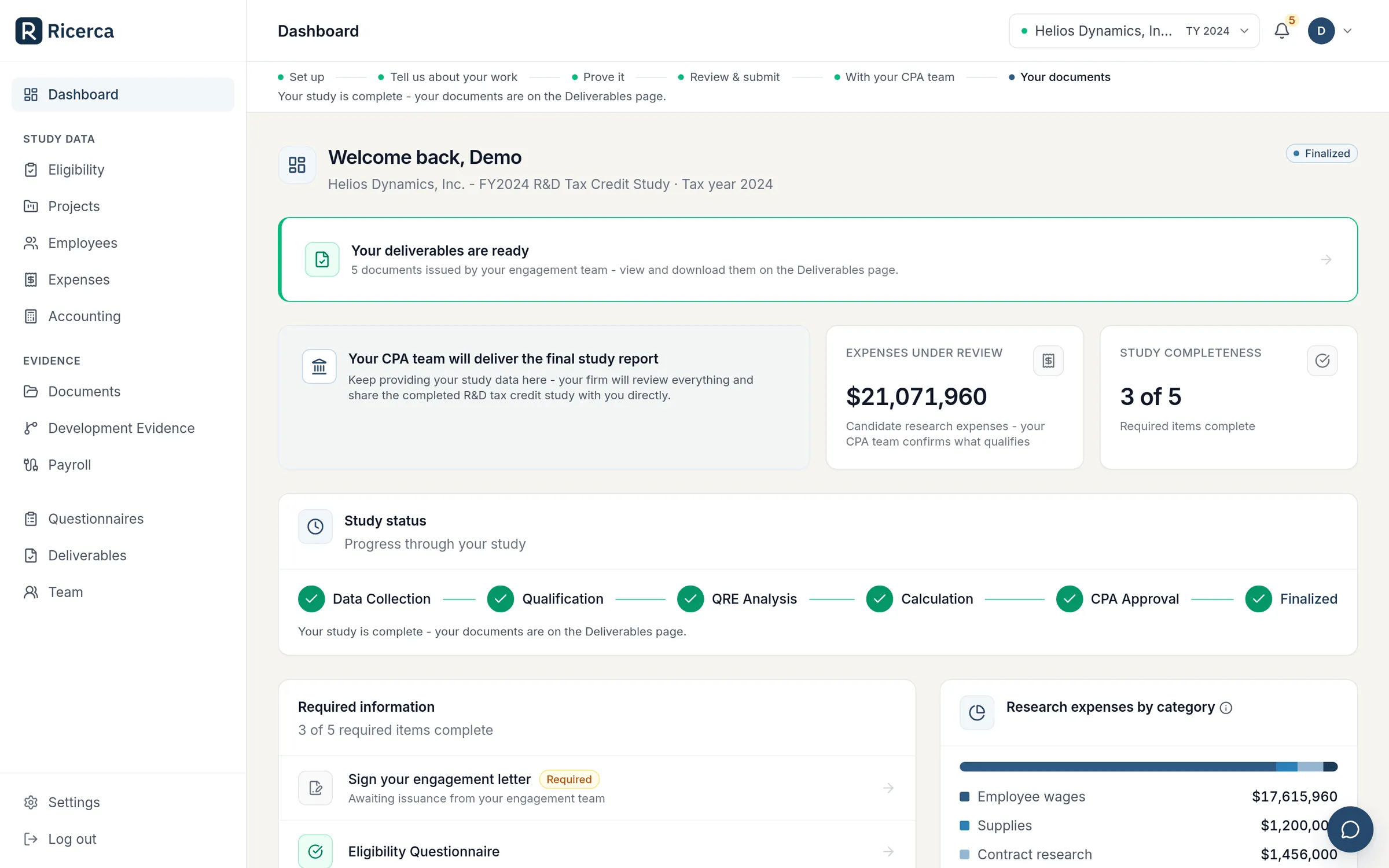
- Callout 1: The client’s progress runs through a With your CPA team stage.
- Callout 2: Deliverables arrive only once your team has issued them.
- Callout 3: The portal tells the client their CPA team delivers the study.
The client portal on a firm-run study, as the client sees it. Synthetic study data.
The boundary. Your firm signs and files the return. Ricerca does not sign or file returns, and does not represent anyone before the IRS.
See the CPA Firm Portal with us
Tell us about your firm and your clients. We will walk you through the portal on synthetic data and answer your questions.
- 01 We typically reply within one business day.
- 02 A walkthrough of the CPA Firm Portal on synthetic data.
- 03 If it fits, we agree seats and terms in a firm agreement.